

For years, your Google username was permanent. You picked it once — maybe as a teenager, maybe in a rush — and it stuck. That awkward handle followed you into every Gmail, Drive, Photos, and YouTube login for the rest of your digital life.
That’s finally changing.
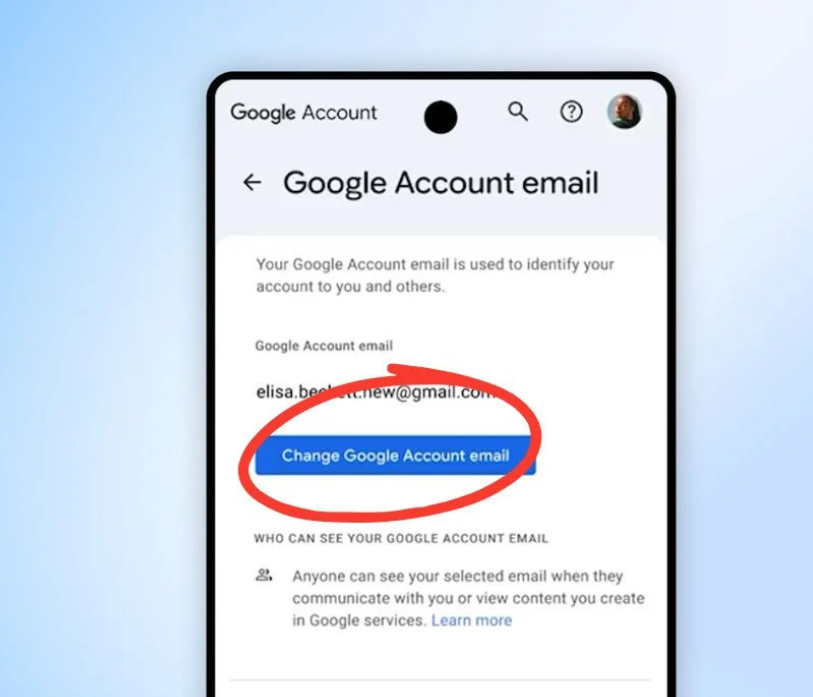
Google has announced that all U.S. Google Account holders can now change their username — the part that appears before @gmail.com — without creating a brand-new account or losing a single file, photo, or email.
What Exactly Is Changing?
Your Google Account username is the identifier you use to sign in to every Google service: Gmail, Google Drive, Google Photos, YouTube, Google Calendar, and more. Until now, once you set it, it was set forever.
Google began testing this feature with select users last year and has now rolled it out to everyone in the United States. It’s a simple but meaningful upgrade — one that acknowledges that people change, and their digital identity should be able to change with them.
Why This Matters
Think about how many people are still using a Google account they created in middle school. Or someone who changed their name after marriage. Or a professional who set up their account casually and now uses it for work every single day.
Until now, those people had two options: live with it, or go through the painful process of creating a new account and manually migrating years of data. Most chose to just live with it.
This update removes that frustration entirely. You can now update your username and keep everything — your inbox, your Drive, your photos, your history — exactly as it is.
What Stays the Same After You Change Your Username?
This is the part that might surprise you: everything stays the same. Google carries over all of the following automatically:
- ✅ Your entire Gmail inbox, labels, and filters
- ✅ All Google Drive files and folders
- ✅ Your Google Photos library
- ✅ Google Calendar events
- ✅ YouTube watch history and subscriptions
- ✅ App logins and subscriptions tied to your account
- ✅ Your old email address (kept as an alias — emails sent to it still reach you)
The old address doesn’t disappear. Google keeps it as a permanent alias, so anyone who emails your previous address will still reach you without any interruption.
How to Change Your Google Username: Step-by-Step
The process takes just a few minutes. Here’s how to do it:
Step 1: Go to your Google Account settings
Head to myaccount.google.com and sign in if you haven’t already.
Step 2: Open “Personal Info”
In the left-hand navigation menu, click on Personal info. Scroll down to the “Contact info” section and find your Gmail address.
Step 3: Click the edit icon next to your email
Select the option to change your username. Google may ask you to verify your identity with a password or two-factor code for security.
Step 4: Type in your new username
Enter the username you’d like. Google checks availability in real time. Usernames can include letters, numbers, dots (.), and hyphens (-), but no spaces or other special characters.
Step 5: Confirm the change
Once you confirm, your new address is active immediately. Your old address is automatically kept as an alias.
That’s it — you’re done.
A Few Things to Keep in Mind
Before you make the change, there are a couple of things worth knowing:
- The feature is currently U.S.-only. Google has confirmed it’s available to all U.S. account holders now, with international expansion expected in future updates.
- You may not be able to change it again immediately. Google typically enforces a waiting period between username changes, so choose carefully.
- Third-party apps may need updating. While your Google login will update automatically, any apps or services where you’ve manually typed your email address (like newsletter subscriptions or non-Google platforms) won’t know about the change automatically. You’ll want to update those separately.
- Your old address works as an alias indefinitely. You won’t miss emails, but you also won’t be able to give your old address to someone new — Google keeps it reserved for your account.
The Bigger Picture
This update is part of a broader shift in how tech companies think about digital identity. Microsoft has allowed Outlook username changes for years, and Apple offers similar flexibility for iCloud addresses. Google — whose accounts are arguably the most deeply embedded in daily life — was notably behind.
The fact that a Google Account today carries decades of documents, memories, communications, and subscriptions makes the old “permanent username” policy feel increasingly out of step. This change is a welcome acknowledgment that accounts should grow with the people who own them.
If you’ve been waiting years to finally ditch that embarrassing early-2000s Gmail handle, now is your moment. Head to myaccount.google.com, make the change, and move forward with a digital identity that actually feels like you.